Remote app demos.
On Google Meet and Zoom.
Connect your iPhone or Android over USB. In Google Meet or Zoom, share your screen and select the Cable window. Show your apps live.
Mirror iPhone, iPad, and Android screens side by side over USB. Share Cable in Google Meet or Zoom for easy remote app demos.
Download for freemacOS 14+ · Apple silicon & Intel · No account
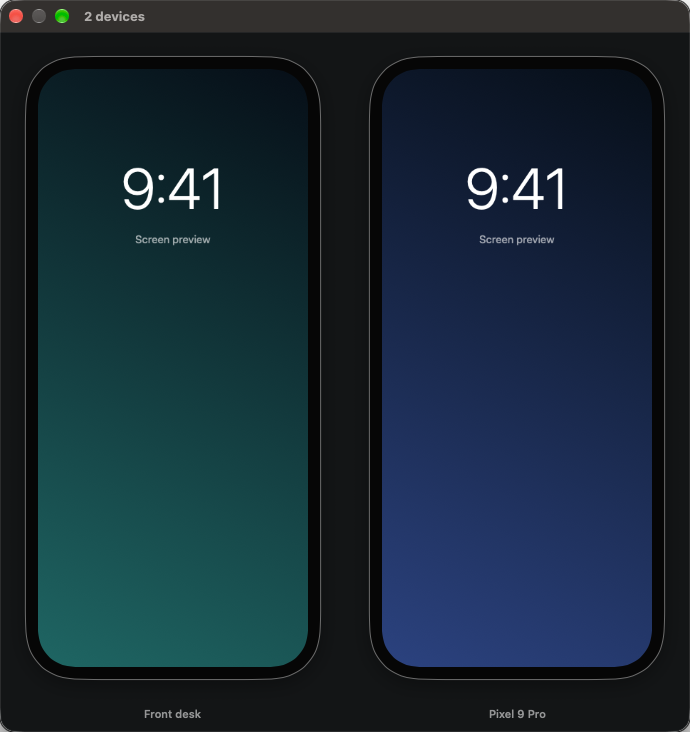
Connect your iPhone or Android over USB. In Google Meet or Zoom, share your screen and select the Cable window. Show your apps live.
Grant Camera permission when Cable asks. That’s what macOS calls access to your iPhone screen—Cable doesn’t record it.
Plug your iPhone or iPad into your Mac with a USB data cable.
Your screen appears in Cable. Add another device whenever you like.
Already viewing Android? Use Help → Allow iPhone Screen Access to add an Apple device.
Open Settings → About phone. Tap Build number seven times. On Samsung, look under Software information.
Open Developer options in Settings and switch on USB debugging.
Accept Allow USB debugging. Choose “Always allow from this computer” for easy reconnection.
No root, Homebrew, or separate adb install needed. Only authorize a Mac you trust; disable USB debugging when you no longer need it.
One small app. All your screens. Just plug in.
Download for freemacOS 14+ · Apple silicon & Intel
Release notes & other downloads ↗